Router-CIM 2027:
Here is the link to the Router-CIM 2027 installer. Download and extract the following zip file.
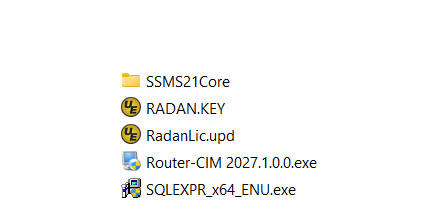
The zip file has the installer along with required dependencies that must all be in the same folder while installing Router-CIM. Refer to the image to make sure you see all the files in the same folder before continuing.
https://www.cimtechsoftware.com/RCIM2027/RCIM_2027.zip
Once extracted, close all programs and be certain any anti-virus software is disabled. Then run the Router-CIM 2027.1.0.0.exe to start the install.
Router-CIM Install Guide: Download Here